

What Are SERP Features?
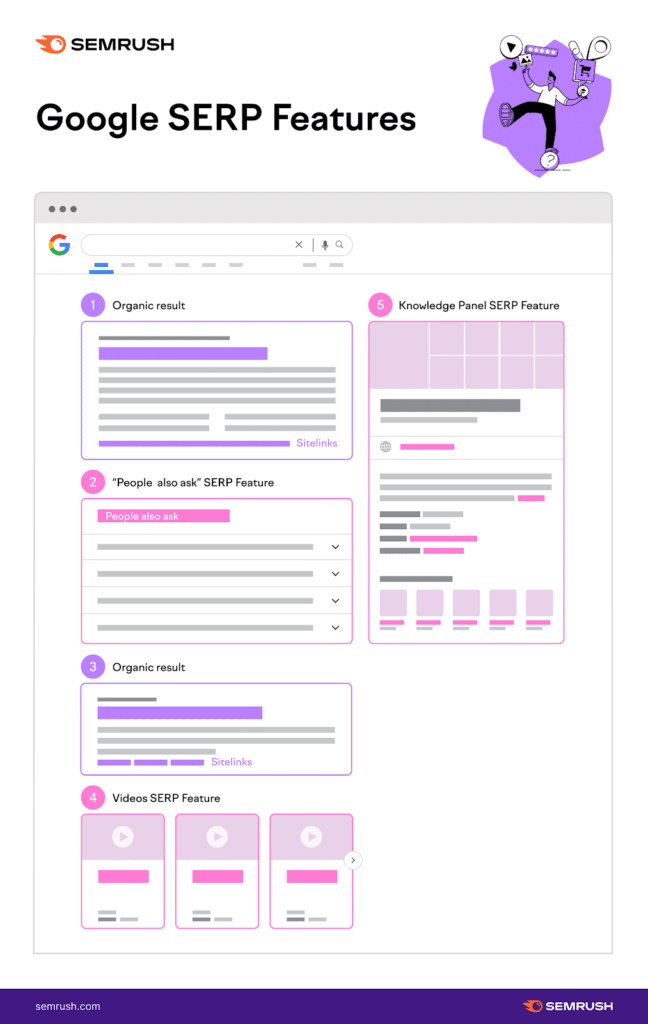
SERP features are unique elements that appear on Google’s search engine results pages (SERPs). They are designed to provide users with more relevant and useful information to enhance their search experience. Here is an exhaustive list of SERP features you may see on Google:
Featured Snippets
Featured Snippets can be displayed above the regular organic results. In the Featured Snippet, Google highlights a portion of text or video from a website to provide a concise, direct answer to the user’s question. Featured Snippets are always linked to the domain from which the information is being pulled. Sometimes, featured snippets may pop up in the form of a widget. This SERP feature is typical for queries about personalities, events, scientific facts, sports, conversions, calculations, colour picking, etc.
Knowledge Panel
Google uses a knowledge panel to provide a quick overview of people, places, or things and often includes significant dates, a brief overview of the topic, and some images. The panel appears at the top right corner of SERPs in desktop results and at the top in mobile devices. The Knowledge Graph powers the knowledge panel, Google’s database that gathers general factual information from sources such as the CIA World Factbook, Wikipedia, and millions of daily searches.
Image Pack
Image Packs appear when Google thinks visual content will serve a more comprehensive results page. Image results may appear as a row or block of related images among organic results. Clicking on a result will take you to the “Images” search tab, and only from there can you get to the website hosting the image.
Top Stories
Top stories are valuable when people want more information about a significant event or breaking news. Google provides a carousel of news stories related to the query, noting when the story was published and by whom.
People Also Ask (PAA)
People Also Ask (PAA) refers to questions Google automatically generates based on queries it believes are related to your question. The PAA box questions are connected to answers that users can click to read on Google SERPs. This can help people better understand their initial question without clicking on other results. Related questions may also appear anywhere on a SERP, but they usually stay toward the top of the page, often under the Featured Snippet. Clicking on the result of a related question will take you to the website that provides the answer.
Sitelinks
Sitelinks are special links that Google features underneath the website result. Google displays these links to help people quickly navigate to a particular part of a website. Usually, it appears for websites when Google easily understands the navigation system.
Related Searches
At the bottom of the SERPs, Google also provides users with a “related searches” portion, prompting other queries related to their initial search. Google offers these related searches, some of which you may not have considered, so you can find the answer you seek.
Shopping Results
If Google detects a buyer’s intent, it will display a carousel of products in shopping ads from various e-commerce sites. This allows people to quickly browse products across multiple e-commerce websites without searching for additional queries on the SERPs.
Reviews
Review snippets complement typical search results with a yellow star rating and sometimes an image. Seeing a rating out of five stars is a universal symbol to communicate value to all kinds of searchers. Studies have shown that search results with reviews can yield a higher average CTR.
Local Pack
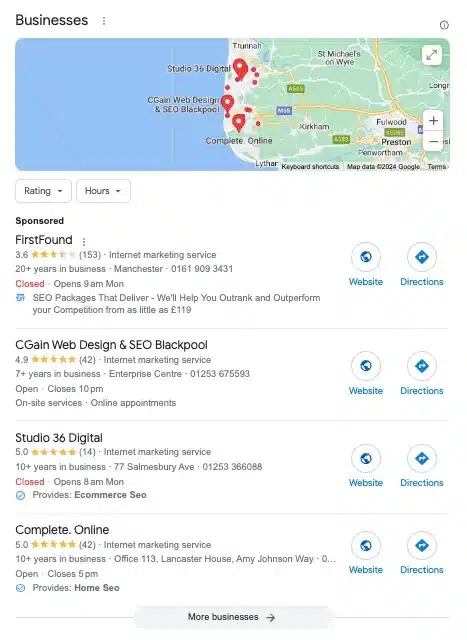
A Local Pack shows up in SERPs when a query includes local service or local intent or includes a geographical name like “coffee shop near me” or “best pizza near in Blackpool.” These results include businesses close to your current location. The Local Pack is positioned at the top of a SERP under the Google Ads results, although occasionally, it may slide below the organic links. A Local Pack usually consists of a map with locations and pins, a five-star rating scale for each location, and three search results (some of which can be ads). Clicking on an icon of a business will provide you with the Google Business Profile listing, which holds more detailed information about the business.
Video
A video SERP feature related to a search query appears on a SERP among organic results. This SERP feature may link to a video hosting platform like YouTube Vimeo, or a webpage with embedded video.
X (Twitter)
In 2015, Google partnered with Twitter (now X) to index tweets in SERPs. X search results usually favour the most recent and trending tweets related to a query. They can appear anywhere on a SERP.
FAQs
FAQs are a list of questions and answers related to a particular topic. They appear on SERPs when Google thinks it can answer the user’s query through a question-answer format. FAQs are typically formatted in an accordion style, with each question expanding to reveal the answer when
How to Tell If Your Site Has SERP Features
To determine if your website is displaying as a SERP feature, Semrush provides the Position Tracking Tool. This tool gives an overview of whether or not pages on your website display as SERP features.
Enter the domain you want to monitor SERP features and click “Set up tracking”. Alternatively, if you’ve already created a project in Semrush and want to add SERP feature tracking, click “Position Tracking” in the left sidebar.
Once you have set up the tracking, configure your domain targeting preferences, including which search engine to track. You can monitor your website’s rankings on Google, Bing, or Baidu. Your choice will tell the tool to track SERP features on that search engine, including AI-powered SERP features where available.
After entering your keywords, you can begin gathering data. To view your rankings, navigate to “Position Tracking” and choose your project. This action will take you to your project’s Position Tracking dashboard, where you can select the “Overview” tab.
Scroll down past the graph, and you will find the list of keywords, their intent category, SERP features, their current position in SERPs, and their online visibility percentage.
You can see how many SERP features appear for a certain keyword by clicking on the number under the SF column. Then, click a category to sort by that SERP feature.
To view your SERP feature live, click on the view SERP icon. This will open a new tab in your browser to show you the live SERP and the feature you are showing up for.
It is important to note that the appearance of SERP features can vary depending on the query type, content, and backlinks. Different SERP features may appear on mobile and desktop devices, and video results and review stars may also be included.
Monitoring SERP features is essential for understanding your website’s organic traffic and click-through rates. Using the Position Tracking Tool, you can identify which SERP features your website appears for and optimise your content accordingly to improve your ranking factors, meta description, and categories to increase organic traffic and click-through rates.
How to Tell if Your Competitors’ Sites Have SERP Features
You can use the Organic Research tool to determine if your competitors are showing up for SERP features. First, select “Organic Research” in the left sidebar and type your competitor’s URL into the search bar. After clicking the green “Search” button, a dashboard will display various website data and metrics.
Scrolling further down the page, you will find a graph that shows the trend of your competitor’s SERP feature rankings. The panel below displays all the SERP features your competitor is ranking for and their missed opportunities. The Positions report provides insight into how much traffic they likely get from each SERP feature they rank for.
The Organic Research tool is useful for identifying if your competitors are ranking for SERP features such as the direct answer box or Google Shopping results. By analysing this data, you can better understand your competitors’ SEO strategies and make informed decisions about your own.
Final Thoughts
In summary, having a well-optimised website is crucial for any business to succeed online. This includes analyzing the SERPs and their features to attract the target audience’s attention. Semrush provides 50+ easy-to-use tools, including Position Tracking and Organic Research, to help professional marketers understand their website’s position in the SERPs and improve their digital marketing efforts.
To rank better in organic search results, site owners must focus on on-page and off-page SEO, competition, and target keywords. Paid search results, including Google Ads and Shopping Ads, can also help boost visibility, but it requires being the highest bidder. Additionally, paid SERP features, local features, and Google Search Ads can be utilised to enhance a website’s visual appeal. Finally, site links can also help improve a website’s visibility.
Frequently Asked Questions
What does the term ‘SERP feature’ mean in search engine optimisation?
SERP feature is a term used in search engine optimisation (SEO) to describe the various elements that appear on a search engine results page (SERP) beyond the traditional organic results. These features are designed to provide users with more relevant and useful information in response to their search queries.
Why are SERP features important for online visibility?
SERP features are important for online visibility because they allow websites to gain greater visibility and attract more traffic. By appearing in SERP features, websites can increase click-through rates and improve their overall search engine rankings.
How can one secure a position in SERP features?
Securing a position in SERP features requires a comprehensive SEO strategy that includes high-quality content, technical optimisation, and a focus on user experience. Websites must also ensure that they provide relevant and useful information to users, as this is a key factor in determining whether or not a website appears in SERP features.
What are the different types of SERP features currently prevalent?
Several different types of SERP features are currently prevalent, including:
- Rich snippets add a visual layer to an existing result, such as review stars for product ratings.
- Paid results: These are bought by bidding on keywords, such as AdWords or Google Shopping.
- Universal results: These appear in addition to organic results, such as image results, news results, and featured snippets.
How have Google’s SERP features evolved in recent years?
Google’s SERP features have evolved significantly in recent years, with the search engine introducing new features and updates to improve the user experience. Some of the most significant changes include the introduction of featured snippets, local packs, and knowledge panels, which provide users with more relevant and useful information in response to their search queries.
Can tools like Semrush or Ahrefs help identify potential SERP feature opportunities?
Yes, tools like Semrush or Ahrefs can help identify potential SERP feature opportunities by providing insights into the keywords and search terms driving website traffic. These tools can also provide information on the types of content that are most likely to appear in SERP features and the websites currently ranking for these features. Using this information, website owners can develop a more effective SEO strategy and increase their chances of appearing in SERP features.

Chris Giles Snr built his first client website in 1995 and has remained at the leading edge of web development and SEO ever since. He is a Fellow of The Chartered Institute of Marketing (FCIM).